WordPress Keyword Research
Most WordPress site owners write content first and think about keywords later. That's backwards — and it's the single biggest reason good content never gets found.
Keyword research isn't about stuffing words into an article. It's about understanding exactly what your audience is searching for, how competitive those searches are, and how to position your content so Google — and increasingly, AI search engines — surface it at the right moment.
In this guide, you'll learn how to do keyword research specifically for WordPress sites: the right tools, the right process, and the strategies that are working right now in 2026. Whether you're a blogger, a WooCommerce store owner, or a service business, this guide gives you a repeatable system you can start using today.
1. What Is Keyword Research and Why Does It Matter?
Keyword research is the process of identifying the exact words and phrases people type into search engines when looking for information, products, or services related to your site.
When you know what your audience is searching for, you can:
- Create content that directly answers their questions
- Rank on the first page of Google for searches your ideal visitors are making
- Drive targeted traffic that is far more likely to convert
- Build topical authority that improves your entire site's rankings over time
- Appear in AI-generated answers on Google SGE, Bing AI, and Perplexity
Without keyword research, you're essentially guessing. You might write excellent content that nobody ever finds — because you didn't know what people were actually searching for when they needed what you offer.
Quick Stat: 68% of all online experiences begin with a search engine. Getting keyword research right is the foundation of everything else you do in SEO.
2. Types of Keywords You Need to Know
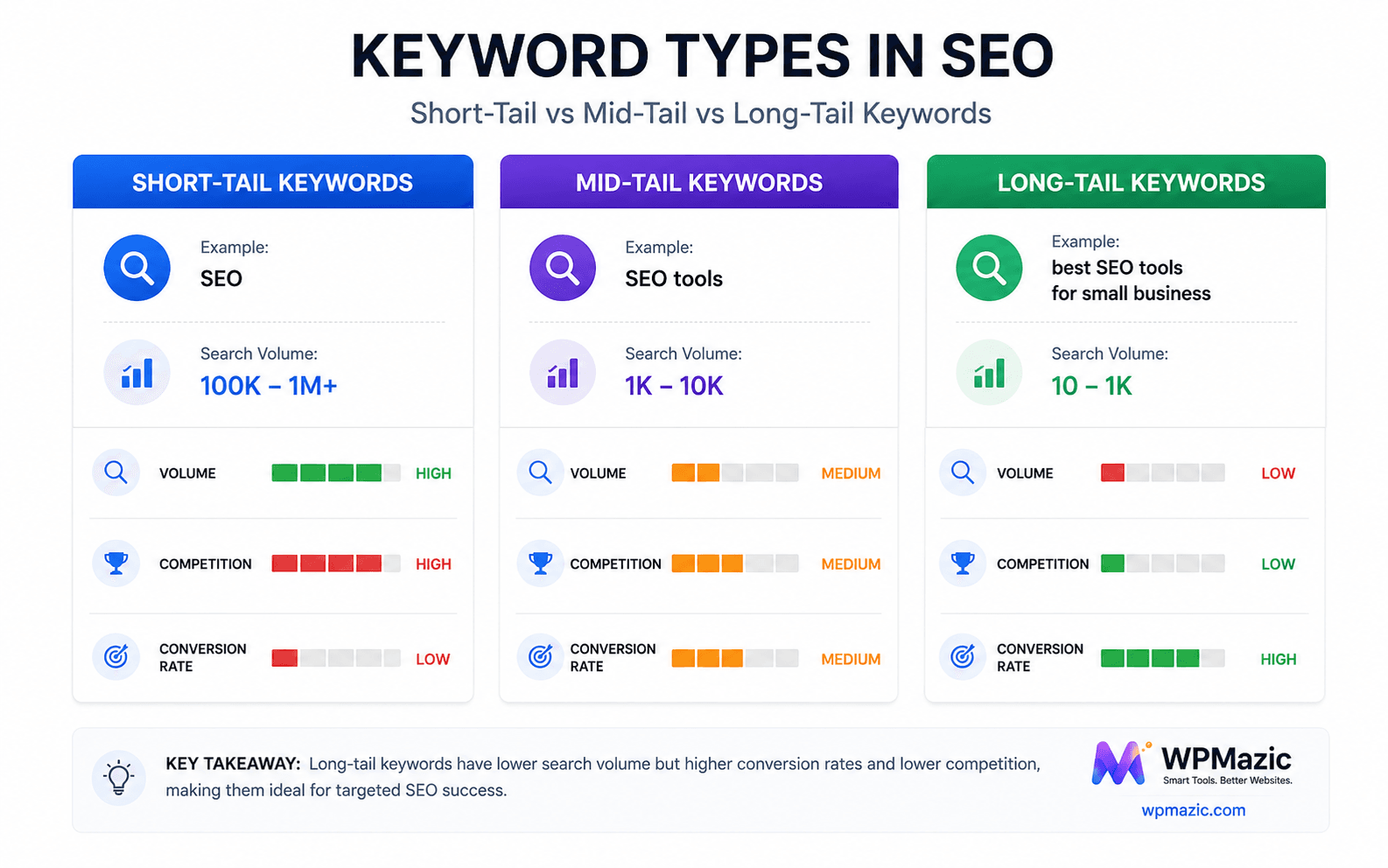
Not all keywords are equal. Understanding the different types helps you build a balanced content strategy that attracts visitors at every stage of their journey.
Short-Tail Keywords (Head Terms)
These are short, broad searches — usually 1–2 words. Examples: "WordPress," "SEO," "plugins."
- Volume: Very high
- Competition: Extremely high
- Intent: Unclear — could mean anything
- Best for: Brand awareness. Hard to rank for as a small or new site.
Mid-Tail Keywords
2–3 word phrases that are more specific. Examples: "WordPress SEO tips," "best WordPress plugins."
- Volume: Moderate to high
- Competition: Moderate
- Intent: Clearer
- Best for: Core content pillars and category pages
Long-Tail Keywords
Phrases of 4+ words that are highly specific. Examples: "how to speed up WordPress without a plugin," "best WooCommerce SEO plugin for small stores."
- Volume: Lower individually — but massive in aggregate
- Competition: Low to moderate
- Intent: Very clear
- Best for: Blog posts, FAQs, product pages. Highest conversion rate.
LSI Keywords (Latent Semantic Indexing)
Related terms and synonyms that Google associates with your main keyword. Example: an article about "WordPress SEO" should naturally include terms like "meta description," "sitemap," "schema markup," "search rankings."
Including LSI keywords naturally in your content helps Google understand the full context of your page — and ranks you for more variations without additional effort.
Branded vs Non-Branded Keywords
- Branded: Searches that include your brand name ("WPMazic SEO plugin"). Target these on your product and homepage.
- Non-branded: Searches with no brand name ("best WordPress SEO plugin 2026"). These bring new visitors who don't know you yet. Most of your blog content should target non-branded keywords.
3. Understanding Search Intent — The Most Important Concept in Modern SEO
Search intent is the reason behind a search query. Google is extraordinarily good at figuring out what people actually want when they type something — and it ranks content that matches that intent.
If you write a sales page for a keyword that has informational intent, Google won't rank it. If you write a blog post for a keyword that has transactional intent, you'll lose conversions. Matching content to intent is non-negotiable.
The Four Types of Search Intent
1. Informational — The person wants to learn something.
Examples: "how does WordPress SEO work," "what is schema markup," "why is my site slow"
Create: blog posts, guides, tutorials, explainers
2. Navigational — The person is looking for a specific website or page.
Examples: "WPMazic login," "WordPress dashboard," "Yoast SEO download"
Create: homepage, product pages, login pages
3. Commercial — The person is researching before making a purchase decision.
Examples: "best WordPress SEO plugin," "WPMazic vs Yoast," "WordPress security plugins compared"
Create: comparison articles, reviews, "best of" lists
4. Transactional — The person is ready to buy or take action.
Examples: "buy WPMazic SEO pro," "WordPress SEO plugin download," "WPMazic pricing"
Create: product pages, pricing pages, landing pages with clear CTAs
Pro Tip: Before writing any piece of content, Google the keyword yourself. Look at the top 5 results. Are they blog posts, product pages, videos, or comparison articles? That tells you exactly what format and intent Google expects for that keyword — match it.
4. Best Keyword Research Tools for WordPress Users
You don't need to spend a fortune on keyword research tools. Here are the best options at every budget level:
Free Tools
Google Search Console — The most underused keyword research tool available. Shows you exactly which queries your site already ranks for, including hidden keyword opportunities you didn't even know existed. Go to Performance → Search Results and sort by Impressions. Keywords where you get impressions but low clicks are prime targets for optimization.
Google Autocomplete — Start typing a keyword in Google and look at the autocomplete suggestions. These are real searches happening right now. Scroll to the bottom of the results page and check "Related searches" too.
People Also Ask (PAA) boxes — Google's PAA boxes show you exactly the questions people ask around a topic. Answer these in your content and you'll appear in featured snippets and PAA results.
Google Keyword Planner — Free with a Google Ads account (you don't need to run ads). Shows search volume ranges and competition levels for any keyword.
AnswerThePublic — Free version available. Visualizes all the questions, comparisons, and prepositions people search for around a topic. Excellent for finding blog post angles and FAQ content.
Ubersuggest (Free tier) — Keyword ideas, basic search volume data, and competitor analysis. Neil Patel's tool works well for basic research.
Paid Tools (Worth the Investment)
Ahrefs — The gold standard for comprehensive keyword research. Keyword difficulty scores, traffic potential, SERP analysis, and competitor keyword gaps. Expensive but powerful.
SEMrush — Similar to Ahrefs with excellent keyword gap analysis and position tracking. Strong for both SEO and PPC research.
Surfer SEO — Particularly useful for content optimization. Shows you what keywords top-ranking pages are using and how to structure your content to compete.
KWFinder by Mangools — More affordable than Ahrefs or SEMrush. Excellent keyword difficulty scoring and solid data. Great for bloggers and small site owners.
WordPress-Specific Tools
Once you've found your keywords, you need to implement them correctly inside WordPress. WPMazic SEO lets you set focus keywords for each post and page, analyses your content's keyword usage in real time, and ensures your meta titles, descriptions, and headings are properly optimized — all from within your WordPress dashboard. It bridges the gap between keyword research and on-page execution.
5. Step-by-Step Keyword Research Process for WordPress
Step 1: Define Your Site's Core Topics (Pillar Topics)
Before hunting for individual keywords, map out the 4–6 main topics your site covers. For a WordPress SEO plugin site like WPMazic, those might be: WordPress SEO, WordPress plugins, WooCommerce SEO, WordPress security, WordPress performance, and WordPress tutorials.
These become your content pillars — the broad topic areas under which all your keyword research and content will be organized.
Step 2: Brainstorm Seed Keywords
For each pillar topic, brainstorm 5–10 seed keywords — the core terms that describe what you cover. Don't worry about volume yet. Examples for "WordPress SEO": wordpress seo, seo plugin wordpress, wordpress meta tags, wordpress ranking, wordpress search optimization.
Step 3: Expand with a Keyword Tool
Take each seed keyword into your chosen tool (Google Keyword Planner, Ahrefs, Ubersuggest, etc.) and expand it. You're looking for:
- Related keyword variations
- Question-based keywords (how, what, why, which)
- Long-tail variations with lower competition
- Local variations if relevant (e.g., "WordPress developer London")
Step 4: Analyse Keyword Metrics
For each keyword, evaluate:
- Search volume — How many monthly searches? Higher is better, but don't ignore low-volume keywords if they're highly relevant.
- Keyword difficulty (KD) — How hard is it to rank? New sites should target KD under 30. Established sites can go higher.
- Cost per click (CPC) — High CPC keywords have commercial value. If advertisers pay a lot for a click, the traffic converts well.
- Traffic potential — The total traffic a top-ranking page for this keyword might receive (including related searches). Often more useful than raw search volume.
Step 5: Check the SERP
Google your target keyword and study the results page carefully:
- What type of content ranks? (Blog posts, product pages, videos, Reddit threads?)
- How long are the top-ranking articles?
- Are there featured snippets, PAA boxes, or AI overviews?
- How strong are the competing sites? (Check their domain authority)
- Is there a "freshness" element? (Do results need to be current?)
Step 6: Map Keywords to Content
Now assign each keyword to a specific page or post. Each page on your site should target one primary keyword and several closely related secondary keywords. Never target the same keyword on two different pages — this causes keyword cannibalization, where your own pages compete against each other.
Create a simple keyword map spreadsheet: URL | Primary Keyword | Secondary Keywords | Search Volume | Status
Step 7: Prioritise and Build a Content Calendar
Not all keywords are equal in opportunity. Prioritise by:
- High volume + low difficulty = publish first
- High commercial intent = publish next (drives revenue)
- High volume + high difficulty = long-term goal, build authority first
- Supporting/cluster content = fill in after pillars are done
6. How to Use Keywords in WordPress Correctly
Finding the right keywords is only half the job. Using them correctly inside WordPress is the other half.
Where to Place Your Primary Keyword
- Page title (H1) — Include it naturally, ideally near the beginning
- SEO title tag — Set via WPMazic SEO or your SEO plugin. Should include the keyword
- Meta description — Include the keyword naturally. This doesn't directly affect rankings but impacts click-through rate
- First paragraph — Mention the primary keyword within the first 100 words
- At least one H2 subheading — Works the keyword into a natural section header
- URL slug — Short, clean URL that includes the keyword: yoursite.com/wordpress-keyword-research
- Image alt text — Describe images accurately but include the keyword where natural
- Body content — Use it naturally throughout. Don't force it. Aim for a keyword density of 0.5–1.5%
Secondary Keywords and LSI Keywords
Your secondary keywords should appear naturally in:
- Subheadings (H2s and H3s)
- Body paragraphs
- Bullet points and lists
- Image captions
- FAQ sections
What NOT to Do
- Don't keyword stuff — Forcing a keyword in unnaturally reads badly and can trigger Google penalties
- Don't target the same keyword on multiple pages — Creates keyword cannibalization
- Don't ignore secondary keywords — They expand your traffic without extra content
- Don't set and forget — Revisit keyword usage when updating older content
Pro Tip: Use WPMazic SEO's on-page analysis to check your keyword placement before publishing. It highlights exactly where your primary keyword appears and flags any optimisation gaps — saving you from common mistakes that cost rankings.
7. Keyword Research in the Age of AI Search
AI-powered search is changing how people find content — and it's changing what keyword research needs to cover.
How AI Search Changes Everything
Google's AI Overviews (formerly SGE), Bing Copilot, and tools like Perplexity now answer many queries directly — without users clicking through to a website. This means:
- Informational keywords are generating fewer clicks than before
- Content needs to be structured for AI extraction, not just human reading
- Question-based keywords are more valuable — they appear in AI answers and PAA boxes
- E-E-A-T signals (Experience, Expertise, Authority, Trust) matter more as AI filters for credibility
New Keyword Strategies for AI Search
- Target question keywords — "How do I...", "What is the best...", "Why does..." These appear in AI-generated answers
- Focus on specific, niche queries — AI handles broad queries well. Detailed, specific answers get cited as sources
- Structure content for extraction — Clear headings, concise answers, bullet points, and FAQ sections help AI parse and cite your content
- Build topical authority — AI search engines favour sources that cover a topic comprehensively. A cluster of deeply interlinked articles on WordPress SEO performs better than isolated posts
- Optimize for zero-click with brand mentions — Even if AI answers the query, being cited as the source builds brand awareness. Structured, authoritative content gets cited
8. Keyword Research for WooCommerce Stores
eCommerce keyword research has its own rules. You're targeting buyers, not just readers.
Product Keywords
Every product page needs a primary keyword based on what someone would search when ready to buy:
- Product name + key attribute: "lightweight WordPress SEO plugin"
- Product + use case: "WordPress SEO plugin for agencies"
- Product + comparison: "best WordPress SEO plugin 2026"
Category Page Keywords
Category pages in WooCommerce rank extremely well when properly optimized. Target broad commercial keywords at the category level and specific keywords at the product level.
Blog Keywords to Support Store Sales
Top-of-funnel blog content drives visitors who are researching before they buy. Examples:
- "How to improve WordPress store SEO" → leads to WooCommerce SEO plugin
- "WordPress vs Shopify for eCommerce" → leads to WordPress advocacy content
- "How to set up schema for WooCommerce products" → leads to WPMazic SEO schema feature
Long-Tail Buyer Keywords
These are goldmines for eCommerce. Low competition, high intent:
- "WordPress SEO plugin with schema automation"
- "best lightweight WordPress SEO plugin for speed"
- "WordPress SEO plugin that handles redirects"
9. Common Keyword Research Mistakes to Avoid
Targeting keywords that are too competitive too early
New sites targeting "WordPress SEO" (KD 80+) will never rank. Start with long-tail, low-competition keywords to build authority before going after the big terms.
Ignoring search intent
Writing an informational blog post for a transactional keyword, or vice versa, is one of the most common reasons content doesn't rank despite being well-written.
Keyword cannibalization
Having two pages targeting the same keyword splits your authority and confuses Google. Consolidate competing pages or clearly differentiate them with unique keyword targets.
Only targeting high-volume keywords
A keyword with 100 monthly searches and low competition is often more valuable than one with 10,000 searches and extreme competition. Traffic potential matters more than raw volume.
Forgetting to update existing content
Keyword research isn't just for new content. Regularly audit your existing posts, update keyword targeting, and refresh content to maintain or improve rankings.
Not tracking keyword performance
If you don't know which keywords are bringing traffic, you can't improve. Set up Google Search Console and track keyword rankings regularly.
Ignoring local keywords
If your business serves a specific location, local keyword modifiers ("WordPress developer London," "WooCommerce store Manchester") drive highly targeted, high-converting traffic.
10. Pro Tips for Advanced Keyword Strategy
- Steal your competitors' keywords — Use Ahrefs or SEMrush to see which keywords your competitors rank for that you don't. These are proven opportunities.
- Build keyword clusters, not isolated posts — A cluster of 5–10 closely related posts on the same topic builds more authority than 10 unrelated posts.
- Use Google Search Console as a goldmine — Filter for keywords ranking in positions 5–20. These are close to page one and a content refresh or optimization push can move them up.
- Target featured snippet positions intentionally — Structure content with a clear, concise 40–60 word answer immediately after the question heading. This is what Google extracts for featured snippets.
- Optimise for "People Also Ask" — Include FAQ sections with exact PAA questions as headings. Use schema markup to tell Google these are Q&A pairs. WPMazic SEO automates FAQ schema generation.
- Seasonal keyword planning — Some keywords spike at specific times of year. Create content 2–3 months before the seasonal peak so it has time to rank.
- Track keyword rankings consistently — Set up position tracking in Google Search Console or a rank tracker. Weekly monitoring lets you catch drops early and respond fast.
- Refresh, don't just create — Updating a well-ranked post with fresh data, new keywords, and better content often drives more traffic than writing something brand new.
11. Frequently Asked Questions
How do I find keywords for my WordPress site for free?
Start with Google Search Console (shows what you already rank for), Google Autocomplete (type your topic and see suggestions), People Also Ask boxes (right in the search results), and AnswerThePublic (free tier available). These four free tools give you more keyword data than most beginners know what to do with.
How many keywords should I target per page?
One primary keyword per page, supported by 3–8 closely related secondary keywords and natural LSI terms. Never target two different primary keywords on one page — pick one and optimize fully for it.
What is a good keyword difficulty score for a new WordPress site?
Aim for keyword difficulty (KD) under 20–30 when starting out. As your site builds domain authority, you can target more competitive keywords. Use tools like Ahrefs, KWFinder, or Ubersuggest to check KD scores before committing to a keyword.
Does keyword research still matter with AI search?
More than ever — but it's evolving. AI search prioritises structured, authoritative content that directly answers specific questions. Question-based long-tail keywords are more valuable than before, and topical depth matters more than targeting a single keyword in isolation.
What is keyword cannibalization and how do I fix it?
Keyword cannibalization happens when two or more pages on your site target the same keyword, causing them to compete against each other in search results. Fix it by either merging the pages into one comprehensive post, or clearly differentiating them with distinct keyword targets. Google Search Console can help identify cannibalizing pages.
How long does it take for a keyword-optimized page to rank?
For new sites, typically 3–6 months for low-competition keywords, 6–12+ months for competitive ones. For established sites with authority, rankings can appear in weeks. Consistency in publishing and link building accelerates the timeline significantly.
Should I use the exact keyword phrase or variations?
Both. Use the exact phrase in your title tag, URL, and first paragraph. Then use natural variations and related terms throughout the rest of the content. Google understands semantic context — it doesn't require exact matches everywhere, and over-exact repetition looks unnatural.
Can I do keyword research without paid tools?
Yes. Google Search Console, Google Autocomplete, PAA boxes, Google Keyword Planner (free with a Google account), and AnswerThePublic's free tier give you enough data to build a solid keyword strategy, especially when starting out. Paid tools speed things up and provide deeper data as your needs grow.
12. Conclusion
Keyword research is the foundation every other part of your WordPress SEO strategy is built on. Get it right and your content finds the right people at the right time. Get it wrong and even great writing disappears into the void.
The process isn't complicated — define your topics, find your seed keywords, expand with tools, analyse the metrics, check the SERP, map keywords to content, and build a calendar. Repeat that cycle consistently and your organic traffic will grow predictably over time.
And as AI search continues to reshape how people find content, the fundamentals stay the same: understand what your audience needs, create content that genuinely delivers it, and structure it so both humans and AI can understand it.
Once you have your keywords mapped, the next step is implementing them correctly in WordPress. WPMazic SEO makes that process seamless — with on-page keyword analysis, automated schema, meta management, and site health monitoring all in one plugin. It's the bridge between keyword strategy and search rankings.
Start with one keyword cluster, publish consistently, and watch the compounding effect build. Your search traffic won't grow overnight — but with the right keyword foundation, it will grow.
Ready to put your keyword strategy into action? Try WPMazic SEO →
https://wpmazic.com/wordpress-keyword-research/?fsp_sid=184


Comments
Post a Comment